Workflow Engine
Jet Admin includes a visual workflow system for automating business logic, external integrations, and data-processing steps.
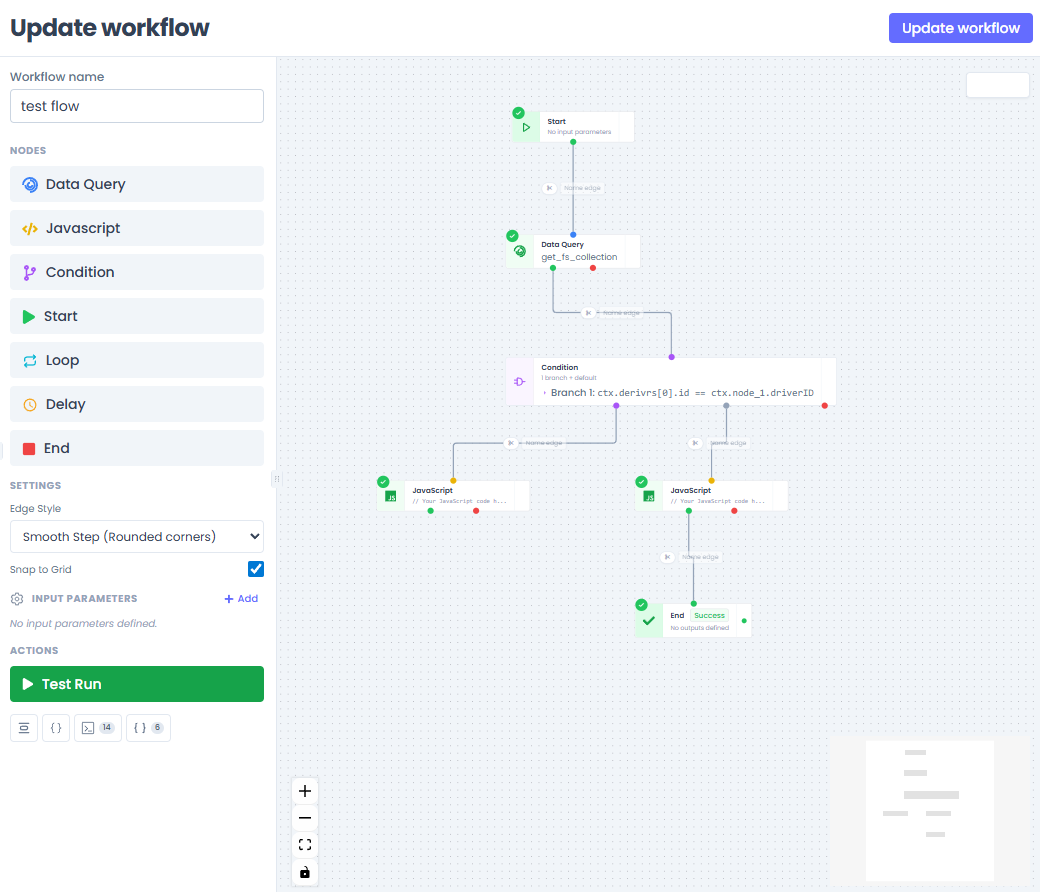
What the workflow feature provides
- a graph-based workflow editor,
- reusable node types,
- persisted workflow inputDefinitions,
- test execution for unsaved graphs,
- runtime execution state tracking,
- live progress updates over Socket.IO.
Current runtime model
The current codebase executes workflows inside the backend process using an in-memory queue adapter backed by fastq.
That is an important implementation detail because some older docs still describe RabbitMQ as the primary runtime. RabbitMQ-related code remains in the repository, but the active startup path uses queue.config.js together with workflowWorkers.js.
Execution shape
At a high level, workflow execution works like this:
- the API creates a workflow instance,
- an initial node job is enqueued,
- the task worker executes a node handler,
- the orchestrator processes the result,
- downstream nodes are scheduled from the DAG,
- websocket updates are emitted as execution progresses.
Current backend capabilities
The workflow API currently supports:
- create, list, get, update, and delete workflows,
- execute a saved workflow,
- test an unsaved workflow definition,
- stop a test run,
- retrieve workflow instances,
- retrieve widget-related workflow status where applicable.
Production vs test runs
The engine supports two major execution modes.
Production runs
- use the persisted workflow definition,
- read nodes and edges from stored records,
- represent the normal execution path for saved workflows.
Test runs
- accept unsaved nodes and edges from the editor,
- store the temporary graph in workflow context,
- let builders validate behavior before saving the workflow.
Node execution
Each node type is executed by a backend handler resolved from its nodeType.
Common categories include:
- JavaScript/script nodes,
- condition/control-flow nodes,
- datasource or data-query related nodes,
- integration-oriented nodes.
The frontend editor for those nodes is largely driven by the shared workflow packages.
Shared package relationship
The workflow feature relies on shared packages such as:
@jet-admin/workflow-nodes@jet-admin/workflow-edges
These packages help keep the editor extensible and prevent the frontend app from hard-coding every workflow node directly in route-level code.
Realtime feedback
As a workflow runs, the backend emits socket updates for node and workflow status. This enables the frontend to display near-live progress during execution and testing.