Roles & Permissions
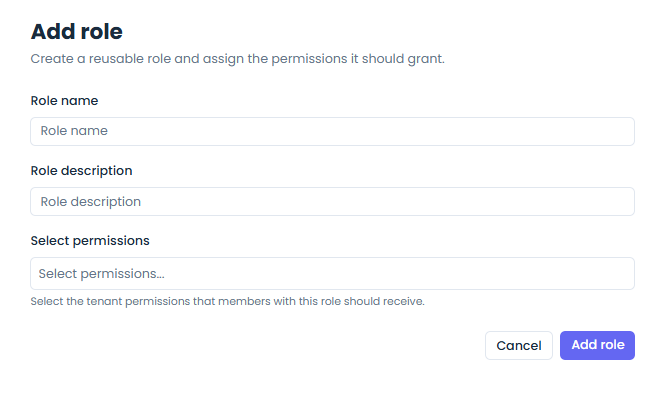
Jet Admin uses a tenant-aware role-based access control (RBAC) model. Authentication answers who the caller is; roles and permissions answer what that caller can do inside a tenant.
Core model
The authorization system is built around these concepts:
- users authenticated through Firebase-backed identity,
- tenants as the isolation boundary for most product data,
- roles attached to users within a tenant,
- permissions attached to roles,
- middleware checks on protected backend routes.
Tenant-aware RBAC
The current backend structure mounts most business functionality under tenant-scoped routes, and permission checks are evaluated in that tenant context.
This means a user can:
- have access in one tenant,
- have different permissions in another tenant,
- be denied from actions outside their assigned tenant roles.
Current backend capabilities
The roles API currently supports:
- list roles,
- create role,
- get role,
- patch role,
- delete role,
- list available permissions.
User-management flows then assign those roles to tenant users.
Request authorization flow
At a high level, protected route access works like this:
- the backend authenticates the request,
- tenant context is resolved from the route,
- the authorization layer loads user-role mappings,
- role-permission mappings are evaluated,
- the request proceeds only if the required permissions are satisfied.
Authentication modes that feed authorization
The current backend supports two main auth entry paths:
- Firebase bearer tokens for user-driven frontend requests,
- API key auth for programmatic access where supported.
Both paths still flow into permission-aware backend logic where tenant-scoped authorization is required.
Admin bypass behavior
The current implementation includes an important shortcut: a tenant user with the ADMIN role can bypass the normal permission evaluation path.
That behavior is useful operationally, but it is also important to keep in mind when debugging authorization outcomes.
Permission design
Permissions are modeled as explicit capabilities rather than page-level booleans.
In practice, routes can require capabilities for areas such as:
- roles,
- users,
- datasources,
- dashboards,
- workflows,
- other tenant-managed resources.
This makes the system more maintainable than hard-coding access rules into each UI screen.
Operational guidance
Use roles when you want to:
- delegate feature access safely,
- separate admin and non-admin capabilities,
- keep tenant teams isolated,
- expose only the parts of the platform relevant to a given team.