Datasources - Complete Guide
🔌 Connect Your Data in Minutes
25+ Built-in Connectors · Secure Connection Management · Real-time Testing
📋 Table of Contents
- What are Datasources?
- Supported Data Sources
- Creating a Datasource
- Datasource Configuration
- Testing Connections
- Managing Datasources
- Security & Encryption
- Troubleshooting
- Best Practices
What are Datasources?
Datasources are connection configurations that allow Jet Admin to communicate with external systems. They serve as the foundation for all data operations in the platform, enabling you to:
- 📊 Query databases for dashboard visualizations
- 🔄 Fetch data for workflow automations
- 📝 Write data back to external systems
- 🔗 Integrate with third-party services
Key Features
- Unified Interface - Consistent API across all connector types
- Secure Storage - Encrypted credentials at rest
- Connection Pooling - Optimized database connections
- Real-time Testing - Validate connections before saving
- SSH Tunneling - Connect to private networks (coming soon)
- Cloning - Duplicate configurations for different environments
Supported Data Sources
Jet Admin supports 25+ data sources across multiple categories:
💾 Databases
| Database | Status | Features |
|---|---|---|
| PostgreSQL | ✅ Stable | Query, Table Manager, Triggers |
| MySQL | ✅ Stable | Query, Table Manager |
| MongoDB | ✅ Stable | Query, Aggregation |
| MS SQL Server | ✅ Stable | Query, Stored Procedures |
| SQLite | ✅ Stable | Query, Local Files |
| CockroachDB | ✅ Stable | Query, Distributed SQL |
| Oracle | 🧪 Beta | Query, PL/SQL |
| Redis | 🧪 Beta | Key-Value Operations |
| Neo4j | 🧪 Beta | Cypher Queries |
☁️ Cloud Services
| Service | Status | Features |
|---|---|---|
| Google BigQuery | ✅ Stable | SQL Queries, Data Export |
| Google Sheets | ✅ Stable | Read/Write, Real-time Sync |
| Google Analytics | ✅ Stable | Reports, Real-time Data |
| Firestore | ✅ Stable | Query, Document Operations |
| Supabase | ✅ Stable | Query, Real-time Subscriptions |
| Airtable | ✅ Stable | Query, Record Operations |
| Amazon S3 | ✅ Stable | File Upload/Download |
| Elasticsearch | ✅ Stable | Search, Aggregations |
🔗 APIs & Messaging
| Service | Status | Features |
|---|---|---|
| REST API | ✅ Stable | Custom Endpoints, Auth |
| GraphQL | ✅ Stable | Queries, Mutations |
| Slack | ✅ Stable | Send Messages, Channels |
| Twilio | ✅ Stable | SMS, Voice, WhatsApp |
| SendGrid | ✅ Stable | Email Templates |
| Stripe | ✅ Stable | Payments, Customers |
| Jira | ✅ Stable | Issues, Projects |
| Notion | ✅ Stable | Pages, Databases |
| RabbitMQ | 🧪 Beta | Publish/Consume |
Creating a Datasource
Step-by-Step Guide
1. Navigate to Datasources
From the Jet Admin sidebar, click on Datasources to open the datasource management page.
2. Click "Create Datasource"
Click the Create Datasource button in the top-right corner to open the datasource catalog.
3. Choose a Connector
Browse or search through the available connectors. They're organized by category:
┌─────────────────────────────────────────┐
│  📊 Databases      ☁️ Cloud Services    │
│  🔗 APIs           📧 Messaging         │
└─────────────────────────────────────────┘
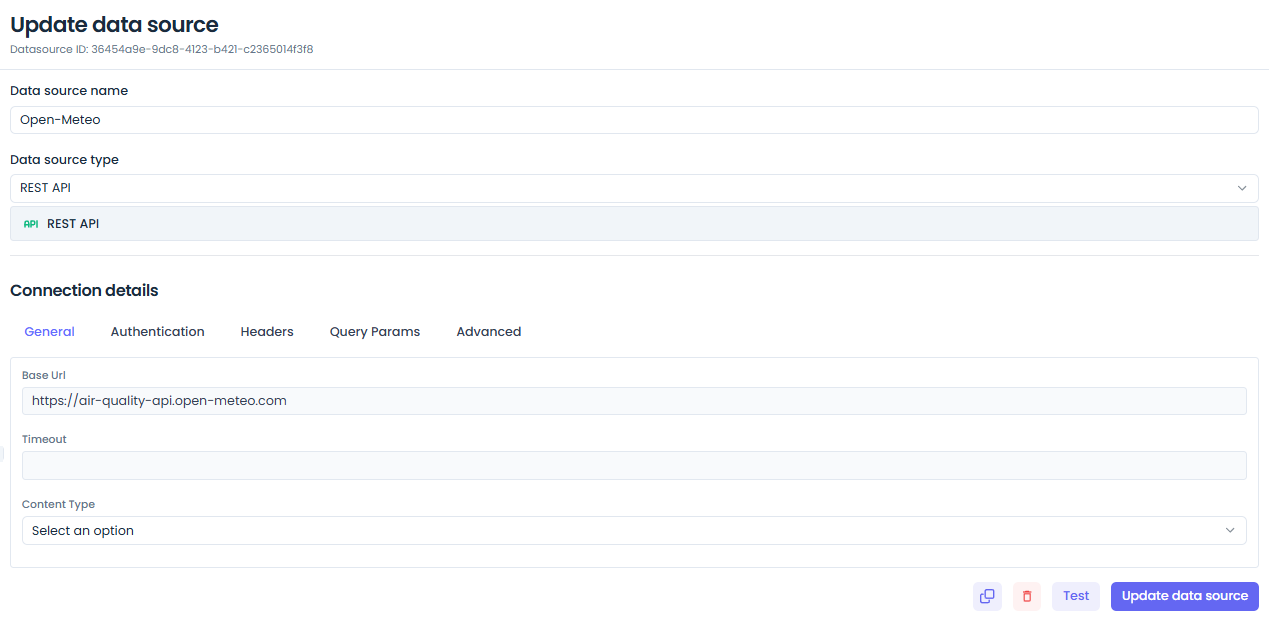
4. Configure Connection
Fill in the connection details specific to your datasource type.
Example: PostgreSQL Configuration
┌────────────────────────────────────────────┐
│  PostgreSQL Connection                     │
├────────────────────────────────────────────┤
│  Datasource Title:  [Production DB       ] │
│  Host:              [db.example.com      ] │
│  Port:              [5432                ] │
│  Database:          [myapp_production    ] │
│  Username:          [admin               ] │
│  Password:          [•••••••••           ] │
│                                            │
│  [✓] Use SSL                              │
│  [ ] Require SSL Certificate              │
└────────────────────────────────────────────┘
5. Test Connection
Before saving, click Test Connection to verify the credentials work correctly.
6. Save Datasource
Once the test succeeds, click Save Datasource to persist the configuration.
Datasource Configuration
Common Configuration Fields
Most datasources share these common fields:
| Field | Type | Required | Description |
|---|---|---|---|
| Datasource Title | String | ✅ | Human-readable name for identification |
| Datasource Type | String | ✅ | Connector type (postgresql, restapi, etc.) |
| Tags | Array | ❌ | Organizational tags for filtering |
| Description | String | ❌ | Notes about the datasource's purpose |
Database-Specific Configuration
PostgreSQL / MySQL
{
  datasourceType: 'postgresql',
  datasourceTitle: 'Production Database',
  datasourceOptions: {
    host: 'localhost',
    port: 5432,
    database: 'myapp',
    username: 'admin',
    password: 'secret',
    ssl: {
      enabled: true,
      rejectUnauthorized: false
    },
    pool: {
      min: 2,
      max: 10
    }
  }
}
MongoDB
{
  datasourceType: 'mongodb',
  datasourceTitle: 'Analytics DB',
  datasourceOptions: {
    connectionString: 'mongodb://user:pass@host:27017/dbname',
    database: 'analytics',
    options: {
      useNewUrlParser: true,
      useUnifiedTopology: true
    }
  }
}
API Configuration
REST API
{
  datasourceType: 'restapi',
  datasourceTitle: 'Payment Gateway',
  datasourceOptions: {
    baseUrl: 'https://api.stripe.com/v1',
    authentication: {
      type: 'bearer',
      token: 'sk_test_...'
    },
    headers: {
      'Content-Type': 'application/json',
      'Accept': 'application/json'
    },
    timeout: 30000
  }
}
GraphQL
{
  datasourceType: 'graphql',
  datasourceTitle: 'GraphQL API',
  datasourceOptions: {
    endpoint: 'https://api.example.com/graphql',
    authentication: {
      type: 'header',
      headerName: 'Authorization',
      headerValue: 'Bearer token123'
    },
    defaultQuery: `
      query GetData($id: ID!) {
        item(id: $id) {
          id
          name
          description
        }
      }
    `
  }
}
Cloud Service Configuration
Google Sheets
{
  datasourceType: 'google_sheets',
  datasourceTitle: 'Marketing Data',
  datasourceOptions: {
    spreadsheetId: '1BxiMvs0XRA5nFMdKvBdBZjgmUUqptlbs74OgvE2upms',
    authentication: {
      type: 'service_account',
      credentials: {
        // Service account JSON key
      }
    }
  }
}
Airtable
{
  datasourceType: 'airtable',
  datasourceTitle: 'Project Tracker',
  datasourceOptions: {
    apiKey: 'keyXXXXXXXXXXXXXX',
    baseId: 'appXXXXXXXXXXXXXX',
    tables: ['Projects', 'Tasks']
  }
}
Testing Connections
How Testing Works
When you click Test Connection, Jet Admin:
- Validates Configuration - Checks required fields
- Establishes Connection - Attempts to connect to the external system
- Executes Test Query - Runs a simple query/ping
- Returns Result - Shows success or detailed error
Test Results
✅ Success
┌─────────────────────────────────────┐
│  ✓ Connection Successful!           │
│                                     │
│  Connected to: postgresql://db:5432 │
│  Database: myapp_production         │
│  Response Time: 45ms                │
└─────────────────────────────────────┘
❌ Failure
┌─────────────────────────────────────┐
│  ✗ Connection Failed                │
│                                     │
│  Error: ECONNREFUSED                │
│  Message: Connection refused        │
│  Host: db.example.com:5432          │
│                                     │
│  Troubleshooting:                   │
│  • Check if the database is running │
│  • Verify firewall settings         │
│  • Confirm credentials are correct  │
└─────────────────────────────────────┘
Common Test Errors
| Error | Cause | Solution |
|---|---|---|
ECONNREFUSED | Database not reachable | Check host/port, firewall rules |
ETIMEDOUT | Connection timeout | Increase timeout, check network |
ER_ACCESS_DENIED | Wrong credentials | Verify username/password |
SSL_REQUIRED | SSL not enabled | Enable SSL in connection |
DATABASE_NOT_FOUND | Invalid database name | Check database exists |
Managing Datasources
Datasource List
View all datasources in a searchable, filterable table:
┌──────────────────────────────────────────────────────────────┐
│  Search datasources...              [Filter by Type ▼]      │
├──────────────────────────────────────────────────────────────┤
│  Name              Type        Tags        Last Tested       │
│  ──────────────────────────────────────────────────────────  │
│  Production DB     PostgreSQL  prod, main  2 min ago    ✓   │
│  Analytics         MongoDB     analytics   1 hour ago   ✓   │
│  Stripe API        REST API    payments    1 day ago    ✓   │
│  Marketing Sheets  Google      marketing   1 week ago   ⚠   │
└──────────────────────────────────────────────────────────────┘
Actions
From the datasource list, you can:
- Edit - Update connection details
- Test - Re-test the connection
- Clone - Duplicate for another environment
- Delete - Remove the datasource (with confirmation)
Cloning Datasources
Cloning is useful for creating environment-specific variants:
Production DB (postgresql://prod-db:5432/app_prod)
    ↓ Clone
Staging DB (postgresql://staging-db:5432/app_staging)
Use Cases:
- Development vs Production databases
- Multiple regional instances
- Backup/failover configurations
Security & Encryption
Credential Encryption
All sensitive datasource credentials are encrypted at rest:
// Encryption process
const encrypted = encryptCredentials({
  password: 'secret123',
  apiKey: 'key_XXXXX'
});

// Stored in database as:
{
  encrypted: 'a1b2c3d4...',
  iv: 'initialization_vector'
}
Access Control
Datasources are protected by RBAC:
| Permission | Description |
|---|---|
datasource:list | View datasource list |
datasource:read | View datasource details |
datasource:create | Create new datasources |
datasource:update | Edit existing datasources |
datasource:delete | Remove datasources |
datasource:test | Test connections |
Network Security
Best Practices:
- Use SSL/TLS - Always enable encrypted connections
- Restrict IPs - Whitelist Jet Admin server IPs
- Use Service Accounts - Don't use personal credentials
- Rotate Keys - Regularly update API keys and passwords
- Audit Access - Monitor datasource usage logs
Troubleshooting
Connection Issues
"Connection Refused"
Symptoms: Test connection fails with ECONNREFUSED
Solutions:
- Verify the host and port are correct
- Check if the database/service is running
- Ensure firewall allows connections from Jet Admin
- Test connectivity using telnet or nc:
telnet db.example.com 5432
"Connection Timeout"
Symptoms: Test hangs and eventually times out
Solutions:
- Check network connectivity
- Increase timeout in datasource options
- Verify DNS resolution
- Check for network proxies
"Authentication Failed"
Symptoms: Connection established but auth fails
Solutions:
- Double-check username/password
- Verify the user has correct permissions
- Check if password expired
- For APIs, verify the token hasn't expired
SSL/TLS Issues
"SSL Required"
Solutions:
- Enable SSL in datasource configuration
- For self-signed certs, disable certificate validation (dev only)
- Install CA certificate on Jet Admin server
"Certificate Verification Failed"
Solutions:
- Check certificate hasn't expired
- Verify certificate chain is complete
- Ensure hostname matches certificate
Performance Issues
Slow Queries
Solutions:
- Add database indexes
- Optimize query logic
- Increase connection pool size
- Use read replicas for heavy queries
Connection Pool Exhaustion
Solutions:
- Increase max pool size
- Reduce idle timeout
- Check for connection leaks
- Monitor active connections
Best Practices
Organization
✅ Use Descriptive Names
Good: "Production PostgreSQL - Orders DB"
Bad: "Postgres 1"
✅ Add Tags for Filtering
Tags: ['production', 'orders', 'postgresql']
Tags: ['staging', 'analytics', 'mongodb']
✅ Document Purpose
{
  datasourceTitle: 'Analytics DB',
  description: 'Main analytics database for dashboard metrics. Updated hourly via ETL pipeline.'
}
Security
✅ Use Environment-Specific Credentials
Development: dev_user / dev_pass
Staging: staging_user / staging_pass
Production: prod_user / prod_pass
✅ Enable SSL Everywhere
ssl: {
  enabled: true,
  rejectUnauthorized: true // except for self-signed in dev
}
✅ Rotate Credentials Regularly
- API keys: Every 90 days
- Database passwords: Every 60 days
- Service accounts: Every 180 days
Performance
✅ Configure Connection Pools
pool: {
  min: 2,    // Minimum idle connections
  max: 20,   // Maximum total connections
  idleTimeout: 30000
}
✅ Use Read Replicas
// For read-heavy workloads
readReplicas: [
  'postgresql://replica1:5432/db',
  'postgresql://replica2:5432/db'
]
✅ Set Appropriate Timeouts
timeout: 30000,        // 30s for most queries
queryTimeout: 60000,   // 60s for complex queries
connectionTimeout: 5000 // 5s to establish connection
Monitoring
✅ Test Connections Regularly
- Automated health checks every 5 minutes
- Alerts on consecutive failures
✅ Monitor Usage
- Track query execution times
- Monitor connection pool usage
- Alert on high error rates
✅ Audit Access
- Log all datasource modifications
- Review access patterns monthly
- Remove unused datasources
Next Steps
- Data Queries - Build queries using datasources
- Workflow Integration - Use datasources in workflows
- Backend Implementation - Technical details
- Frontend Implementation - UI components