Data Queries - Complete Guide
📝 Build and Execute Queries
SQL Queries · Parameters · Testing · Caching · Execution
📋 Table of Contents
- Overview
- Creating a Data Query
- Query Configuration
- Query Parameters
- Query Execution
- Testing Queries
- Query Results
- Advanced Features
- Examples
Overview
Data Queries are reusable query definitions that execute against your configured datasources. They are the foundation for:
- ✅ Dashboard widgets
- ✅ Workflow automation
- ✅ Data transformations
- ✅ API endpoints
- ✅ Scheduled jobs
Key Features
- Native SQL - Write queries in PostgreSQL dialect
- Parameterized Queries - Use dynamic variables
- Query Testing - Test before saving
- Result Caching - Optimize performance
- Run on Load - Auto-execute options
- AI Assistance - Generate queries with AI
- Bulk Operations - Create multiple queries
Query Types
| Query Type | Description | Use Case |
|---|---|---|
| SELECT | Retrieve data | Dashboards, reports |
| INSERT | Create records | Form submissions |
| UPDATE | Modify records | Data updates |
| DELETE | Remove records | Cleanup operations |
| UPSERT | Insert or update | Sync operations |
Creating a Data Query
Step-by-Step Guide
- Navigate to Data Queries in sidebar
- Click "Create Data Query" button
- Select datasource from dropdown
- Configure query settings
- Write SQL query
- Define parameters (if any)
- Test the query
- Save for reuse
Required Fields
| Field | Type | Required | Description |
|---|---|---|---|
| Query Title | String | ✅ Yes | Unique name for the query |
| Datasource | Datasource | ✅ Yes | Database connection to use |
| Query Type | String | ✅ Yes | query (SQL) or gui (visual) |
| Query | String | ✅ Yes | SQL statement to execute |
Optional Fields
| Field | Type | Default | Description |
|---|---|---|---|
| Run on Load | Boolean | false | Execute automatically when loaded |
| Description | String | - | Query documentation |
| Tags | Array | [] | Organizational tags |
| Timeout | Integer | 300s | Query execution timeout |
Query Configuration
Query Title
Purpose: Identify this query in lists and dropdowns.
Validation:
- Required: Yes
- Min Length: 1 character
- Max Length: 255 characters
Best Practices:
✅ Good: "GetActiveUsers"
✅ Good: "CreateNewOrder"
✅ Good: "UpdateProductInventory"
❌ Bad: "Query1"
❌ Bad: "test"
Datasource Selection
Purpose: Choose which database connection to use.
Options:
- Any configured PostgreSQL datasource
- REST API datasource (for API calls)
- Datasource dropdown with refresh button
How to Select:
- Click datasource dropdown
- Select from available datasources
- Click refresh icon if datasource not showing
- Datasource loads with connection details
Query Type
Purpose: Choose query input method.
Options:
| Type | Value | Description |
|---|---|---|
| Raw SQL | query | Write SQL directly (Recommended) |
| GUI Builder | gui | Visual query builder (Coming soon) |
Recommended: Use Raw SQL for full control
Query Editor
Purpose: Write the SQL statement to execute.
Features:
- Syntax highlighting (PostgreSQL dialect)
- Auto-completion
- Line numbers
- Code folding
- Format/Beautify button
Editor Options:
{
  "queryType": "query",
  "query": "SELECT * FROM users WHERE active = true;"
}
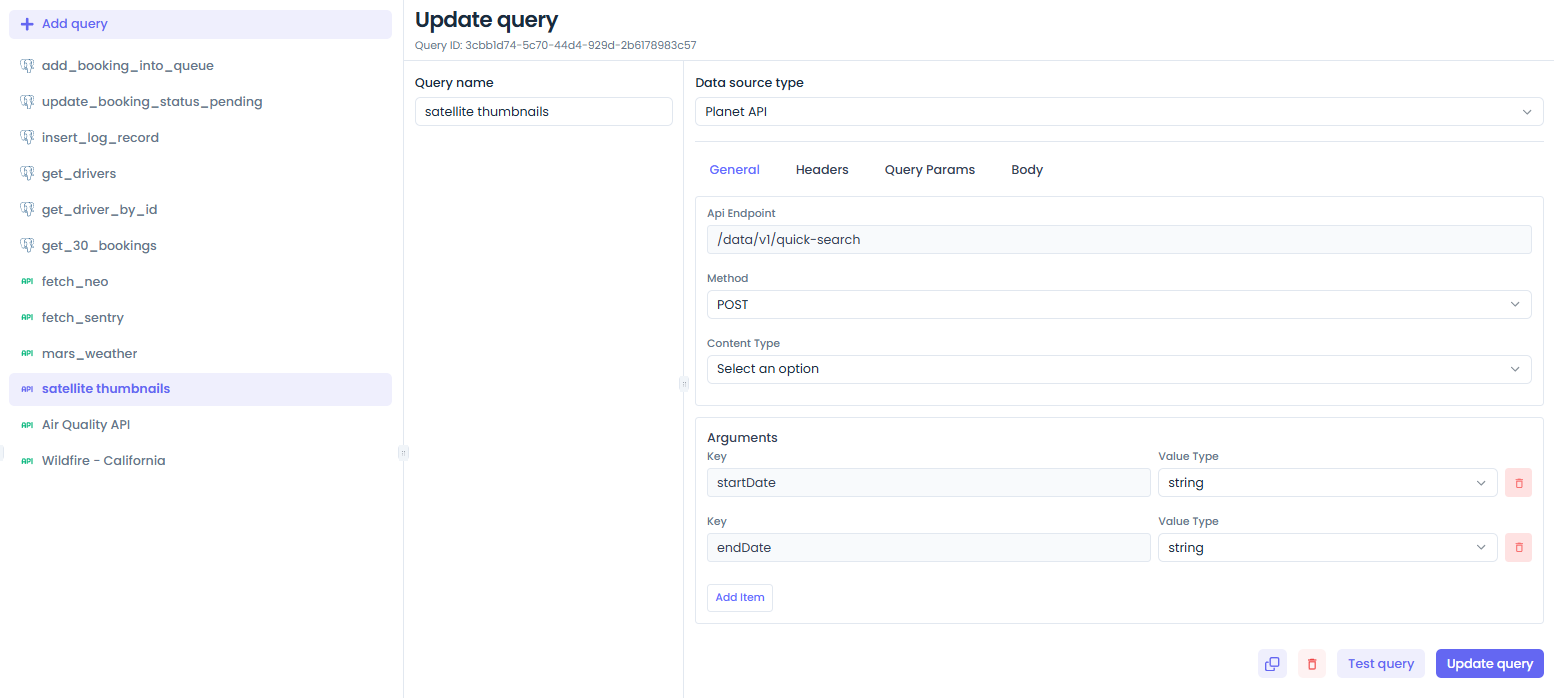
Query Parameters
Overview
Parameters allow you to create dynamic queries that accept input values at execution time.
Parameter Structure
| Field | Type | Required | Options | Description |
|---|---|---|---|---|
| Key | String | ✅ Yes | - | Parameter name |
| Type | String | ✅ Yes | See below | Parameter data type |
Parameter Types
| Type | Description | Example | SQL Usage |
|---|---|---|---|
| string | Text value | "active" | WHERE status = {{status}} |
| number | Numeric value | 42 | WHERE age > {{minAge}} |
| boolean | True/false | true | WHERE active = {{isActive}} |
| array (, separated) | List of values | "1,2,3" | WHERE id IN ({{ids}}) |
| object (JSON stringified) | JSON object | {"name":"John"} | Complex filters |
Adding Parameters
Step 1: Click "Add Parameter" button
Step 2: Configure parameter:
{
  "key": "userId",
  "type": "string"
}
Step 3: Use in query:
SELECT * FROM users WHERE id = {{userId}};
Parameter Usage in Queries
String Parameters
Configuration:
{
  "key": "status",
  "type": "string"
}
Query:
SELECT * FROM orders WHERE status = {{status}};
Execution:
{
  "status": "pending"
}
Result:
SELECT * FROM orders WHERE status = 'pending';
Number Parameters
Configuration:
{
  "key": "minAmount",
  "type": "number"
}
Query:
SELECT * FROM orders WHERE amount > {{minAmount}};
Execution:
{
  "minAmount": 100
}
Result:
SELECT * FROM orders WHERE amount > 100;
Boolean Parameters
Configuration:
{
  "key": "isActive",
  "type": "boolean"
}
Query:
SELECT * FROM users WHERE active = {{isActive}};
Execution:
{
  "isActive": true
}
Result:
SELECT * FROM users WHERE active = true;
Array Parameters
Configuration:
{
  "key": "userIds",
  "type": "array (, separated)"
}
Query:
SELECT * FROM users WHERE id IN ({{userIds}});
Execution:
{
  "userIds": "1,2,3,4,5"
}
Result:
SELECT * FROM users WHERE id IN (1,2,3,4,5);
Object Parameters (JSON)
Configuration:
{
  "key": "filters",
  "type": "object (JSON stringified)"
}
Query:
SELECT * FROM products WHERE metadata @> {{filters}};
Execution:
{
  "filters": "{\"category\":\"electronics\"}"
}
Result:
SELECT * FROM products WHERE metadata @> '{"category":"electronics"}';
Multiple Parameters
Example Query with Multiple Parameters:
SELECT
  u.id,
  u.name,
  u.email,
  o.total,
  o.status
FROM users u
JOIN orders o ON u.id = o.user_id
WHERE
  u.status = {{userStatus}}
  AND o.created_at >= {{startDate}}
  AND o.created_at <= {{endDate}}
  AND o.total >= {{minAmount}}
ORDER BY o.created_at DESC
LIMIT {{limit}};
Parameters:
[
  {
    "key": "userStatus",
    "type": "string"
  },
  {
    "key": "startDate",
    "type": "string"
  },
  {
    "key": "endDate",
    "type": "string"
  },
  {
    "key": "minAmount",
    "type": "number"
  },
  {
    "key": "limit",
    "type": "number"
  }
]
Query Execution
Execution Methods
1. Manual Execution
How to:
- Open query in editor
- Click "Test" or "Run" button
- Provide parameter values (if any)
- View results
Use Case: Testing and debugging
2. Run on Load
Configuration:
{
  "runOnLoad": true
}
Behavior:
- Query executes automatically when page loads
- Useful for dashboard widgets
- Parameters can be passed via URL or context
Use Case: Dashboard widgets, auto-refreshing data
3. API Execution
Endpoint:
POST /api/v1/tenants/:tenantID/data-queries/:queryID/execute
Request Body:
{
  "parameters": {
    "userId": "123",
    "status": "active"
  }
}
Use Case: External integrations, custom applications
4. Workflow Execution
In Workflow Node:
- Add "Data Query" node
- Select query from dropdown
- Map parameters
- Configure output variable
Use Case: Automation, multi-step processes
Execution Options
Timeout
Purpose: Maximum execution time before query is cancelled.
Type: Integer (seconds)
Default: 300 seconds (5 minutes)
Configuration:
{
  "dataQueryOptions": {
    "timeout": 60
  }
}
When to Adjust:
- Increase for complex analytical queries:
600(10 min) - Decrease for simple lookups:
30(30 sec) - Default for most queries:
300(5 min)
Caching
Purpose: Store query results to improve performance.
Cache Key Components:
- Query SQL
- Parameter values
- Datasource ID
- User/Tenant context
Cache Behavior:
- Results cached for duration of session
- Cache invalidated on data changes
- Manual refresh available
Testing Queries
Test Panel
Location: Right side of query editor
Features:
- Parameter input fields
- Execute button
- Results display
- Error messages
- Execution time
Testing Steps
Step 1: Configure Parameters
Enter values for each parameter:
- userId: 123
- status: active
Step 2: Click "Test Query"
Step 3: Review Results
Test Results
Success
┌─────────────────────────────────────────┐
│  ✓ Query Executed Successfully          │
│                                         │
│  Execution Time: 45ms                   │
│  Rows Affected: 150                     │
│                                         │
│  Results:                               │
│  ┌────┬─────────┬──────────┬─────────┐ │
│  │ id │ name    │ email    │ status  │ │
│  ├────┼─────────┼──────────┼─────────┤ │
│  │ 1  │ John    │ j@ex.com │ active  │ │
│  │ 2  │ Jane    │ j@ex.com │ active  │ │
│  └────┴─────────┴──────────┴─────────┘ │
└─────────────────────────────────────────┘
Error
┌─────────────────────────────────────────┐
│  ✗ Query Execution Failed               │
│                                         │
│  Error: relation "userss" does not exist│
│  SQL State: 42P01                       │
│  Position: 15                           │
│                                         │
│  Query:                                 │
│  SELECT * FROM userss WHERE ...         │
│                                         │
│  Suggestions:                           │
│  • Check table name spelling            │
│  • Verify table exists in database      │
│  • Check schema permissions             │
└─────────────────────────────────────────┘
Common Test Errors
| Error | Cause | Solution |
|---|---|---|
relation does not exist | Typo in table name | Check spelling |
column does not exist | Invalid column | Verify column names |
permission denied | Insufficient privileges | Grant permissions |
syntax error | SQL syntax issue | Check SQL syntax |
parameter undefined | Missing parameter | Define all parameters |
type mismatch | Wrong parameter type | Match parameter types |
Query Results
Result Format
Standard Format:
{
  "success": true,
  "data": [
    { "id": 1, "name": "John" },
    { "id": 2, "name": "Jane" }
  ],
  "rowCount": 2,
  "executionTime": 45,
  "fields": [
    { "name": "id", "dataType": "uuid" },
    { "name": "name", "dataType": "text" }
  ]
}
Result Metadata
| Field | Type | Description |
|---|---|---|
| success | Boolean | Whether query succeeded |
| data | Array | Query result rows |
| rowCount | Integer | Number of rows returned |
| executionTime | Integer | Execution time in ms |
| fields | Array | Column metadata |
| error | Object | Error details (if failed) |
Accessing Results
In Widgets
// Widget data binding
{
  "queryId": "query-uuid",
  "resultPath": "data"
}
In Workflows
// Workflow node output
{
  "outputVariable": "queryResult",
  "accessAs": "{{ctx.queryResult}}"
}
In JavaScript
// Access in script nodes
const users = ctx.queryResult.data;
const count = ctx.queryResult.rowCount;
Advanced Features
AI Query Generation
Purpose: Generate SQL queries using natural language.
How to Use:
- Click "AI Generate" button
- Enter description in plain English
- AI generates SQL query
- Review and edit as needed
- Save query
Example:
Input: "Get all active users with their orders from last month"

Output:
SELECT u.*, o.*
FROM users u
LEFT JOIN orders o ON u.id = o.user_id
WHERE u.status = 'active'
  AND o.created_at >= NOW() - INTERVAL '1 month'
Bulk Query Creation
Purpose: Create multiple queries at once.
Use Case:
- Batch operations
- Multiple related queries
- Import/export queries
Format:
{
  "dataQueries": [
    {
      "dataQueryTitle": "GetUsers",
      "dataQueryOptions": {
        "query": "SELECT * FROM users"
      }
    },
    {
      "dataQueryTitle": "GetOrders",
      "dataQueryOptions": {
        "query": "SELECT * FROM orders"
      }
    }
  ]
}
Query Templates
Purpose: Reuse common query patterns.
Built-in Templates:
- SELECT with pagination
- INSERT with return
- UPDATE with conditions
- DELETE with soft delete
- Aggregation queries
- JOIN queries
Custom Templates: Create your own templates for common operations in your organization.
Query Versioning
Purpose: Track query changes over time.
Features:
- Version history
- Rollback to previous versions
- Change comments
- Comparison view
Examples
Example 1: Simple SELECT
Title: GetActiveUsers
Datasource: Production PostgreSQL
Query:
SELECT id, name, email, created_at
FROM users
WHERE active = true
ORDER BY created_at DESC;
Parameters: None
Use Case: Dashboard user list
Example 2: Parameterized SELECT
Title: GetUserOrders
Datasource: Production PostgreSQL
Query:
SELECT
  o.id,
  o.order_number,
  o.total,
  o.status,
  o.created_at,
  u.name as customer_name,
  u.email as customer_email
FROM orders o
JOIN users u ON o.user_id = u.id
WHERE
  o.user_id = {{userId}}
  AND o.status = {{status}}
ORDER BY o.created_at DESC;
Parameters:
[
  {
    "key": "userId",
    "type": "string"
  },
  {
    "key": "status",
    "type": "string"
  }
]
Use Case: User order history page
Example 3: INSERT with Return
Title: CreateUser
Datasource: Production PostgreSQL
Query:
INSERT INTO users (name, email, status, created_at)
VALUES ({{name}}, {{email}}, {{status}}, NOW())
RETURNING id, name, email, created_at;
Parameters:
[
  {
    "key": "name",
    "type": "string"
  },
  {
    "key": "email",
    "type": "string"
  },
  {
    "key": "status",
    "type": "string"
  }
]
Use Case: User registration form
Example 4: UPDATE with Conditions
Title: UpdateOrderStatus
Datasource: Production PostgreSQL
Query:
UPDATE orders
SET
  status = {{newStatus}},
  updated_at = NOW(),
  updated_by = {{updatedBy}}
WHERE
  id = {{orderId}}
  AND status != 'cancelled'
RETURNING id, status, updated_at;
Parameters:
[
  {
    "key": "orderId",
    "type": "string"
  },
  {
    "key": "newStatus",
    "type": "string"
  },
  {
    "key": "updatedBy",
    "type": "string"
  }
]
Use Case: Order status update workflow
Example 5: Aggregation Query
Title: GetDailyRevenue
Datasource: Analytics PostgreSQL
Query:
SELECT
  DATE(created_at) as date,
  COUNT(*) as order_count,
  SUM(total) as total_revenue,
  AVG(total) as avg_order_value
FROM orders
WHERE
  created_at >= {{startDate}}
  AND created_at <= {{endDate}}
  AND status = 'completed'
GROUP BY DATE(created_at)
ORDER BY date DESC;
Parameters:
[
  {
    "key": "startDate",
    "type": "string"
  },
  {
    "key": "endDate",
    "type": "string"
  }
]
Use Case: Revenue dashboard chart
Example 6: Complex JOIN with Array Parameter
Title: GetUsersByIds
Datasource: Production PostgreSQL
Query:
SELECT
  u.id,
  u.name,
  u.email,
  COUNT(o.id) as order_count,
  SUM(o.total) as total_spent
FROM users u
LEFT JOIN orders o ON u.id = o.user_id
WHERE u.id = ANY(STRING_TO_ARRAY({{userIds}}, ','))
GROUP BY u.id, u.name, u.email
HAVING COUNT(o.id) > 0
ORDER BY total_spent DESC;
Parameters:
[
  {
    "key": "userIds",
    "type": "array (, separated)"
  }
]
Use Case: Bulk user analysis
Next Steps
- PostgreSQL Queries - PostgreSQL-specific features
- Workflow Integration - Use queries in workflows
- Widget Binding - Display query results
- API Reference - Execute via API