Data Source
The Data Source Module stores, validates, and manages connections for your connectors such as PostgreSQL, MySQL, REST APIs, Firebase, Google Sheets, Excel, and more.
This is where integration with various data sources begins. Configure a data source to perform data queries or set up data listeners.
Create a data source
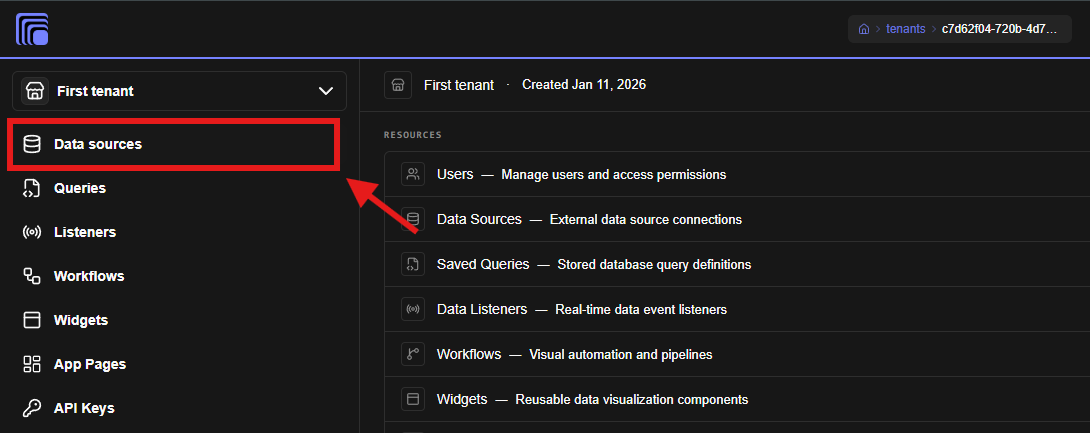
- Navigate to the Data sources tab
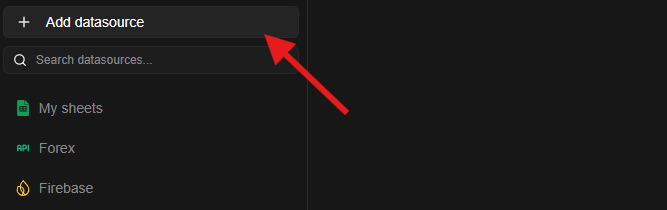
- Click Add data source
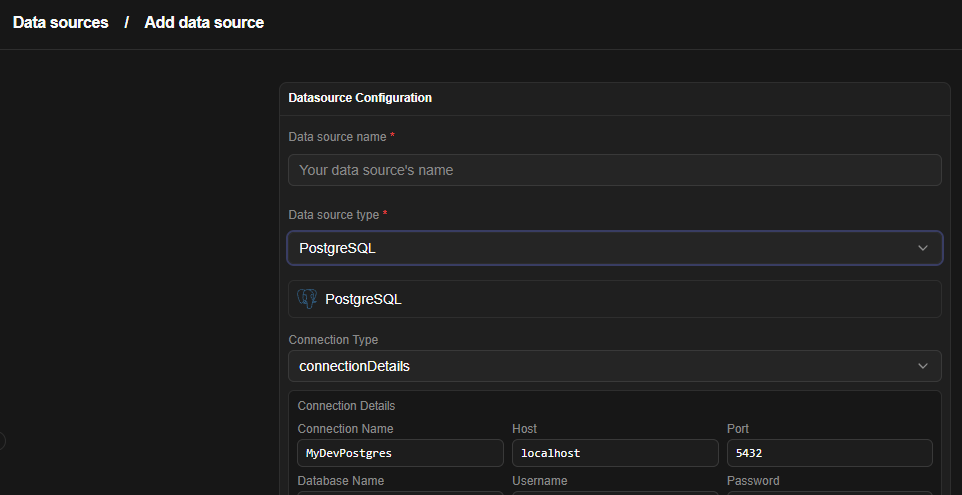
- Enter your data source name
- Select the data source type from the dropdown
- A configuration wizard will appear below the selection with fields to set up the data source.
- Fill in the details and click save
Jet Admin supports various data sources listed below:
- Airtable
- BigQuery
- CockroachDB
- Elasticsearch
- Excel / CSV
- Firestore
- Google Analytics
- Google Sheets
- GraphQL
- Jira
- Kafka
- MongoDB
- MQTT
- Microsoft SQL Server (MSSQL)
- MySQL
- NATS
- Neo4j
- Notion
- Oracle Database
- PostgreSQL
- RabbitMQ
- Redis
- REST API
- Amazon S3
- SendGrid
- Slack
- SQLite
- Server-Sent Events (SSE)
- Stripe
- Supabase
- Syslog
- Twilio
- Webhook
- WebSocket
- Web URL (Web Scraping / URL Data Source)
Endpoints
Mounted at /api/v1/tenants/:tenantID/datasources:
| Method | Path | Permission | Notes |
|---|---|---|---|
| GET | /schemas | datasource.list | per-type config JSON schemas driving the wizard |
| GET | / | datasource.list | list (supports ?folderID=) |
| POST | /test | datasource.execute | validate a config without saving |
| POST | /upload | datasource.create | file-backed sources (memory upload, 10 MB) |
| GET | /:datasourceID/export | datasource.read | export single source as bundle item |
| POST | /:datasourceID/clone | datasource.create | deep copy with fresh ID |
| GET | PATCH | DELETE | /:datasourceID | datasource.read/update/delete | CRUD on one connection |
| GET | POST | /:datasourceID/proxy | datasource.execute | browser-safe proxied calls through the backend |
| POST | / | datasource.create | create; credentials encrypted, creator access granted |
Credentials
Connection secrets (connectionString, webhookSecret, OAuth tokens) are encrypted at rest — datasource rows via datasourceOptions and OAuth/Google tokens via vaultService.storeCredential (AES-256-GCM, VAULT_ENCRYPTION_KEY). They are masked (●●●●●●●●) in API responses and redacted in logs (utils/sensitive.js). Rotating VAULT_ENCRYPTION_KEY requires re-encrypting tblVaultCredentials.encryptedData — there is no automatic rotation; plan downtime. See Configuration Reference and Security.