Data Query
Data Query Module Overview
The Data Query Module lets users write and run queries or supported commands on configured Data Sources. Data Queries perform CRUD operations on any supported data source.
note
Queries always run against a datasource in the same tenant (datasourceID FK). Execution from workflows, app pages, and listeners reuses the caller's identity plus an origin reference for delegated authorization — see Identity & Access Management.
Create a Data Query
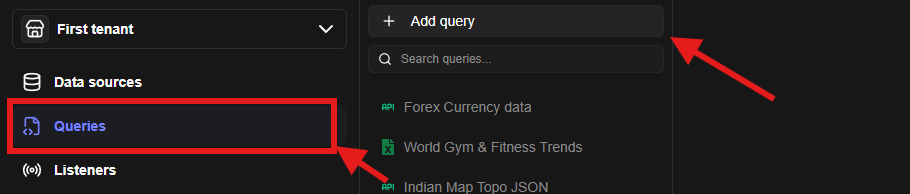
- Click on the Queries Tab
- Click on Add query button in the right hand side drawer list
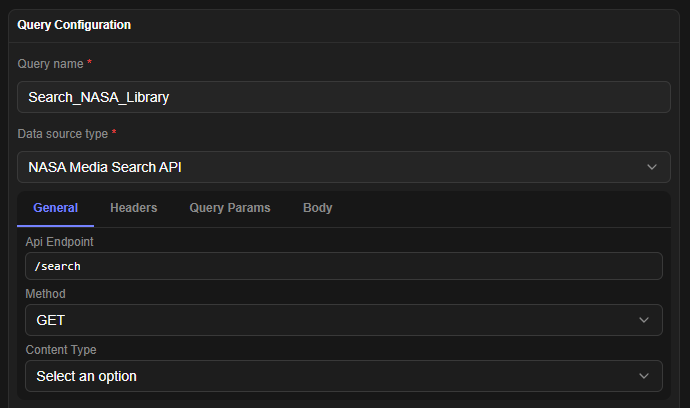
- A query configuration form will appear
- Select your configured data source
- Dynamic fields will appear in the form which are supported by the data source
- Once all the details are filled, you can click on test to test your query
Query Variable Usage
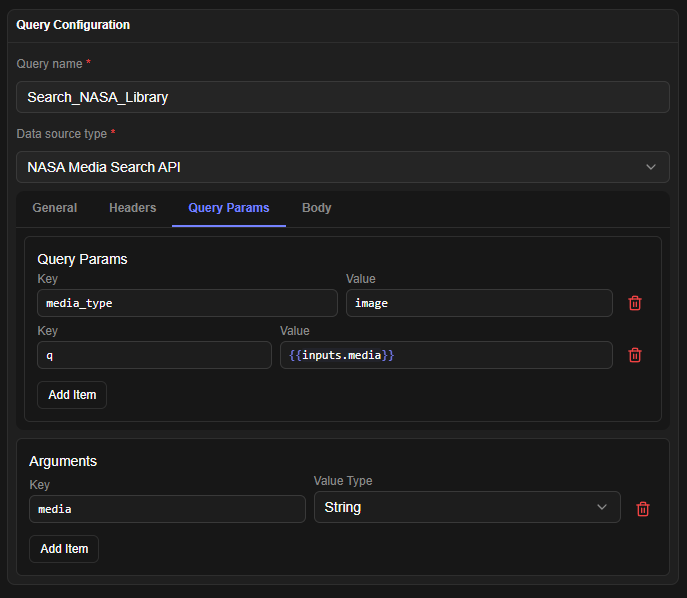
- Queries support moustache format based variable usage.
- Add all the variables which you want in the Args section.
- Use the
{{inputs.variable}}format to reference that variable anywhere in the query config (excluding title and description).
- Use the
Endpoints
Mounted at /api/v1/tenants/:tenantID/queries:
| Method | Path | Permission | Notes |
|---|---|---|---|
| GET | /schemas | dataquery.list | per-datasource config JSON schemas for the query form |
| GET | / | dataquery.list | list (supports ?folderID=) |
| POST | / | dataquery.create | create; grants creator access |
| GET | /:dataQueryID/export | dataquery.read | export single query as bundle item |
| POST | /:dataQueryID/clone | dataquery.create | deep copy with fresh ID |
| PATCH | /queryTest | dataquery.execute | ad-hoc test without saving |
| GET | PATCH | DELETE | /:dataQueryID | dataquery.read/update/delete | CRUD on one query |
| POST | /:dataQueryID/queryTest | dataquery.execute | test saved query |
| POST | /:dataQueryID/run | dataquery.execute | execute with Args variables |
Execution notes
POST /runand/queryTestresolve{{inputs.*}}server-side before dispatching to the connector in@jet-admin/datasources-logic. Secrets are resolved from vault/datasourceOptionsand redacted in responses viautils/sensitive.js.- Workflows call queries through the
dataQuerynode (nodeConfig.dataQueryID); app pages throughTRIGGER_QUERYwidget actions. Both pass the original caller identity + origin for delegated authorization.