Data Query
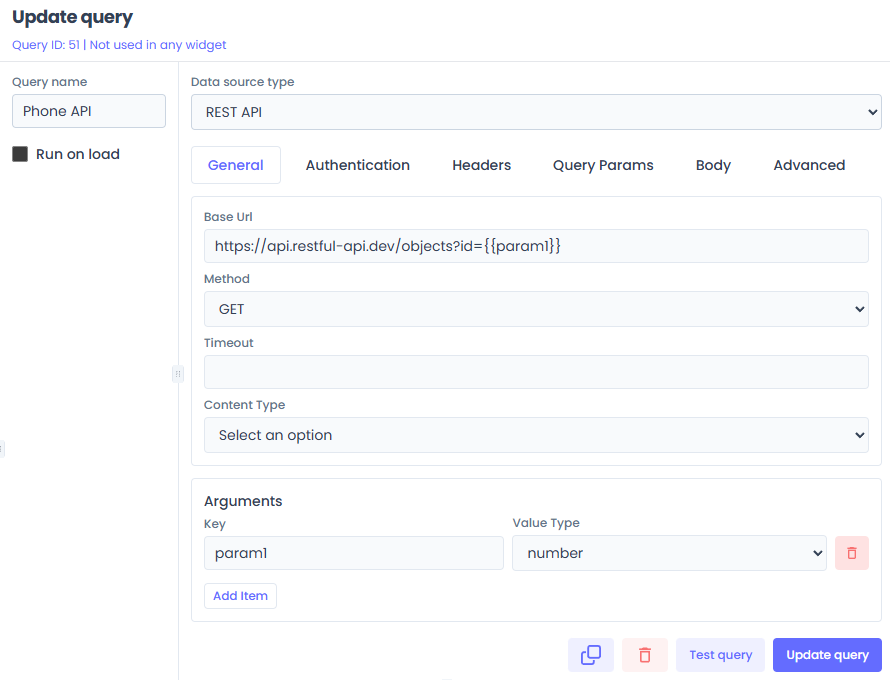
This document provides a comprehensive overview of the Jet Admin Query Engine, detailing its architecture, data flow, and implementation across the frontend, backend, and shared packages.
1. Architecture Overview
The Query Engine is designed to be modular, schema-driven, and extensible. It decouples the intent of a query (the user configuration) from the execution (the actual database call).
High-Level Data Flow
2. Directory Structure
The system is distributed across three main locations:
- Backend Core (
apps/backend/modules/dataQuery): Orchestrates execution, handles API requests, and manages permissions. - Datasource Logic (
packages/datasources-logic): Contains the "Drivers" or adapters for each specific datasource (e.g., PostgreSQL, Stripe). This is where the actual connection code lives. - Datasource Types (
packages/datasource-types): Defines the schema (JSON Schema) for the configuration forms. This drives the UI content. - Frontend UI (
apps/frontend/presentation/components/dataQueryComponents): Renders the query builder and triggers execution.
3. The Backend Execution Engine
The heart of the system is the QueryEngine class.
Location: apps/backend/modules/dataQuery/queryEngine/engine.js
Responsibilities:
- Fetching: Retrieving the query definition and datasource credentials (via injected fetchers).
- Interpolation: Replacing template variables (e.g.,
{{args.limit}}) with actual runtime values. - Delegation: Loading the correct "Driver" from the Shared Registry and asking it to execute.
Code Spotlight: engine.js
The executeQuery method is the main entry point:
async executeQuery(dataQueryID, runtimeArgs) {
  // 1. Fetch Query
  const query = await this.queryFetcher(dataQueryID);

  // 2. Resolve Template Variables
  // This recursively walks the query options object and replaces strings
  const resolvedTemplate = await this.resolveTemplate(
    query.dataQueryOptions,
    runtimeArgs,
    dataQueryID
  );

  // 3. Get DataSource Adapter (The "Driver")
  const datasource = await this.getDataSource(query, dataQueryID);

  // 4. Execute
  const result = await datasource.execute(resolvedTemplate);
  return result;
}
The Template Resolution uses a recursive text replacement strategy:
async resolveStringTemplate(template, runtimeArgs, ...) {
    const blocks = extractTemplateBlocks(template); // Finds {{...}}
    for (const block of blocks) {
        // SAFETY WARNING: This uses eval() to resolve paths like "args.user.id"
        const value = eval(`runtimeArgs.${block.expression}`);
        result = result.replace(block.fullMatch, value);
    }
    return result;
}
4. The "Driver" Layer (Datasource Logic)
This package implements the Adapter Pattern. Each datasource type (Postgres, MySQL, REST API) has its own directory.
Location: packages/datasources-logic/src/data-sources/
The Registry
packages/datasources-logic/src/data-sources/index.js maintains a map of all available adapters:
import PostgreSQLDataSource from "./postgresql/datasource";
// ... imports ...

const dataSources = {
  postgresql: PostgreSQLDataSource,
  mysql: MySQLDataSource,
  // ...
};

export default {
  getDataSource(type) {
    return dataSources[type.toLowerCase()];
  }
};
The Driver Implementation
A driver must extend the base DataSource class and implement execute.
Example: PostgreSQL Driver (packages/datasources-logic/src/data-sources/postgresql/datasource.js)
import { Client } from "pg";

export default class PostgreSQLDataSource extends DataSource {
  async execute(dataQueryOptions, context) {
    // 1. Unpack connection info from this.config (injected in constructor)
    const client = new Client({
      connectionString: this.config.datasourceOptions?.connectionString,
      ...this.config.datasourceOptions?.connectionData,
    });

    try {
      // 2. Connect
      await client.connect();

      // 3. Run Query (the query string comes from 'dataQueryOptions', which is fully resolved)
      const result = await client.query(dataQueryOptions.query);

      // 4. Return Rows
      return result.rows;
    } finally {
      await client.end();
    }
  }
}
5. The Frontend Query Builder
The frontend logic is heavily schema-driven. Instead of hardcoding forms for every database, it uses JSON Forms to render inputs based on a schema defined in packages/datasource-types.
Location: apps/frontend/src/presentation/components/dataQueryComponents/
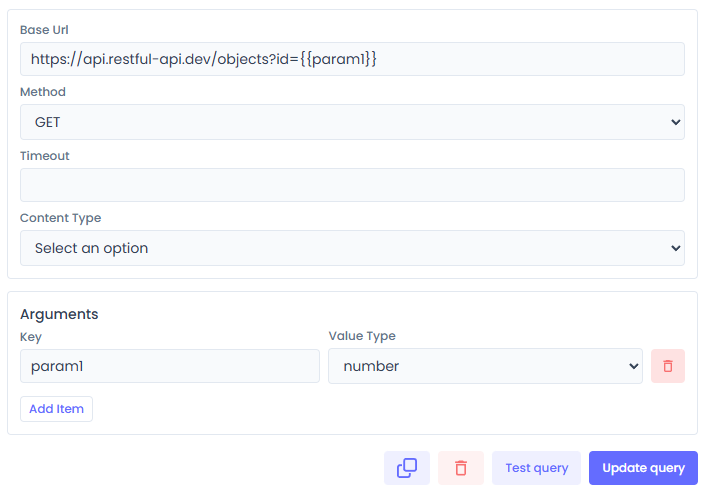
Key Components
-
DataQueryEditor.jsx:- Selects the datasource.
- Uses
JsonFormsto render the configuration inputs (e.g., SQL text area, checkboxes). - The schema comes from:
currentDatasourceType.queryConfigForm.
// Pseudocode from DataQueryEditor.jsx
<JsonForms
    schema={currentDatasourceType.queryConfigForm.schema}
    uischema={currentDatasourceType.queryConfigForm.uischema}
    data={dataQueryOptions}
    renderers={materialRenderers}
    onChange={...}
/> -
DataQueryTestingForm.jsx:- The "Run" button.
- Handles "Prompt for Arguments": If the query needs inputs (e.g.,
{{args.id}}), it opens a modal (DataQueryArgsForm) to ask the user for values before sending the request. - Calls
testDataQueryByIDAPIortestDataQueryByDataAPI.
Query Execution Flow (Frontend)
- User clicks Run.
DataQueryTestingFormchecksdataQueryOptions.args.- If args exist, show Modal -> User enters values -> Submit.
- Call API:
POST /api/dataQuery/run-by-id
{
    "dataQueryID": 123,
    "argValues": { "id": 5 }
}
6. Adding a New Query Type
To add a new datasource type (e.g., "Snowflake"), you would:
-
Define Schema (
packages/datasource-types):- Create
snowflake/formConfig.json(for connection fields). - Create
snowflake/queryConfig.json(for query editor fields, e.g., SQL textarea).
- Create
-
Implement Driver (
packages/datasources-logic):- Create
snowflake/datasource.js. - Implement
execute()using the Snowflake Node.js driver. - Create
snowflake/connection.jsfortestConnection.
- Create
-
Register (
packages/datasources-logic/src/data-sources/index.js):- Import and add to
dataSourcesmap.
- Import and add to
-
Backend & Frontend automatically pick it up due to the registry execution model.
7. Security & Validation
- Backend:
dataQuery.middleware.js(not shown above but exists) ensures the user belongs to the tenant. - Validation: The query options are verified against the Zod schema or JSON schema before execution in some paths (though primarily relied on Schema validation at the UI layer).
- Secrets: Passwords are decrypted server-side before being passed to the Driver constructor.